We can integrate with Go4Schools via their API using an API key.
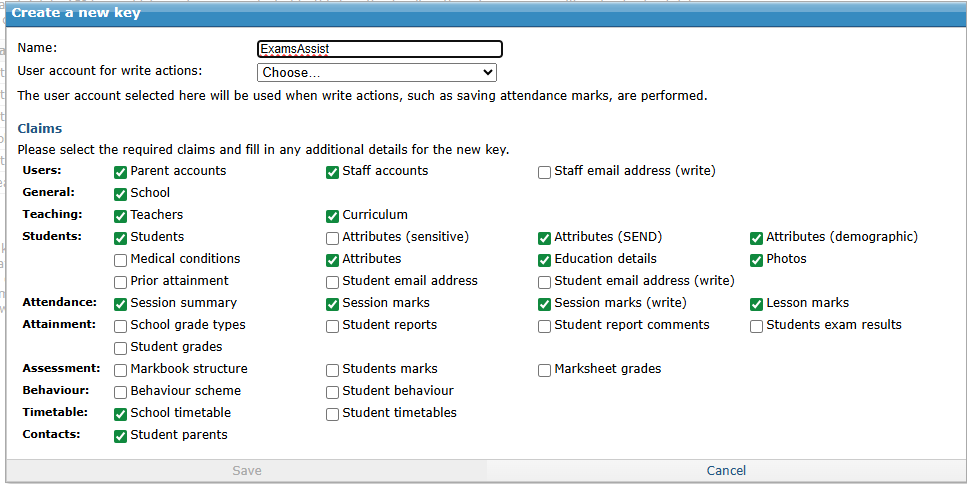
You will need to create the key with the following permissions:
General-School (school.read)
Attendance-Session Summary (school.attendance.read)
Attendance-Session marks (students.attendance.session.read)
Attendance-Lesson marks (students.attendance.lesson.read)
Attendance - Session marks (write) (students.attendance.session.write)
Contacts-Student Parents (students.parents.read)
Student-Students (students.read)
Students-Attributes (students.attributes.read)
Students-Attributes(demographic) (students.attributes.demographic.read)
Students-Attributes(SEND) (students.attributes.send.read)
Students-Education Details (students.education.read)
Students-Email Address (students.emailaddress.read)
Students-Photos (students.photos.read)
Teaching-Curriculum (school.curriculum.read)
Teaching-Teachers (school.teachers.read)
Timetable-School Timetable (school.timetable.read)
Timetable-Student Timetables (students.timetable.read)
Users-Parent Accounts (school.accounts.parents.read)
Users-Staff Accounts (school.accounts.staff.read)
Login to SchoolWorkSpace and navigate to School Settings > Data
Click on Go4Schools Settings and paste the API Key there and confirm the current academic year (e.g. 2025)

 Exams Assist